
*BRAND: Micrososft
*VERSION: Visio Standard
*LICENSE: Perpetual
*ACTIVATIONS: 1
*FORMAT: Digital download
*PLATFORM: Windows 10, 11
*REGION: Global
*INSTALLING: Easy to follow instructions to renew subscription or download & install
Focus on Project Management: Microsoft Visio 2021 Standard is designed to effectively support project management, facilitating task planning and tracking with suitable tools.
Creation of Dynamic Organizational Charts: The feature allows the design of detailed organizational charts, providing a clear view of organizational structures and hierarchies.
Development of Practical Mind Maps: Visio 2021 Standard allows the creation of visually organized mind maps, useful for brainstorming and intuitively structuring ideas.
Seamless Integration with Microsoft Products: The tool integrates seamlessly with other Microsoft applications, such as Word and Excel, facilitating data transfer and consistency across different software.
Access to New BPMN Templates: The Standard version includes recent BPMN (Business Process Model and Notation) templates for effectively representing business processes.
Variety of Graphic Styles and Formats: Visio 2021 Standard offers a wide range of graphic styles and formats, allowing customization of diagrams to meet specific project needs.
Create Professional Diagrams Easily with Microsoft Visio 2021 Standard
Microsoft Visio 2021 Standard is a powerful diagram creation software, specially designed for Windows. It offers a simple and intuitive interface allowing users to create professional diagrams, organizational charts, floor plans, network diagrams, and more. With Microsoft Visio 2021 Standard, you can easily create diagrams and integrate them into other Microsoft products such as Word, PowerPoint, or Excel. You can also export your diagrams to various file formats such as PDF, PNG, or JPEG. The software provides a wide range of shapes, templates, and styles to help you design your diagrams quickly and efficiently. Additionally, you can integrate and automatically update data from other sources, such as Excel spreadsheets.
Practical Advantages with Microsoft Visio 2021 Standard
Microsoft Visio 2021 Standard stands out for its numerous practical advantages, making it a preferred choice for professionals needing to create modern and expressive diagrams. Here’s an overview of the main benefits:
Flexible and Customizable Creation
The simplicity of diagram and chart creation is one of Visio 2021 Standard’s main strengths. You can easily design diagrams according to your needs and choose the desired diagram type. Subsequent adjustments are also possible at any time.
Variety of Diagram Types
You don’t need to predefine the types of diagrams you want to create. The extensive selection of templates allows you to remain flexible in your design, ideal for compact solutions in all sectors.
Team Collaborative Work
Collaboration is not limited to individual work but can also be done directly in teams using Microsoft Teams. Synchronization is facilitated by cloud storage, allowing quick retrieval of essential content.
Data-Based Diagrams
Integration with real-time analytics allows automatic development of content. For example, you can create links with other Microsoft applications to use the same information in Visio 2021.
Who is Microsoft Visio 2021 Standard For?
Microsoft Visio 2021 Standard is intended for a variety of users, including:
Professionals and Entrepreneurs: Creating organizational charts, process diagrams, and other business diagrams.
IT Professionals: Developing network diagrams, system architecture, and data flow diagrams.
Engineers: Creating technical diagrams, schematics, and electrical plans.
Teachers and Students: Creating diagrams and process flows for research projects and presentations.
Project Managers: Creating project management diagrams, including Gantt charts and planning diagrams.
Architects: Designing architectural diagrams, plans, and space layouts.
Designers: Creating diagrams for various fields like graphic design, web design, and more.
Researchers: Creating scientific diagrams, including chemical structures and biological flows.
Trainers and Consultants: Creating presentation diagrams and flows for training and consulting projects.
Seamless Integration with the New Windows 11
Microsoft Visio 2021 Standard was recently released alongside Windows 11, bringing new designs and improved performance. This simultaneous release allows for a seamless use of Office applications while optimizing the experience with the new operating system.
Here’s how Microsoft Visio 2021 Standard benefits from this integration:
Harmonized Design
Visio 2021 Standard benefits from Windows 11’s visual adjustments, providing a consistent interface with the operating system and other Office applications. The changes are primarily superficial and do not introduce major new features.
Modern Graphic Elements
The 2021 version includes recent color gradients, wireframe diagrams of applications, workplace planning tools, and adapted AWS templates. These updates enhance Visio’s design and flexibility.
Progressive Evolution
Updates focus on visual aspects, illustrating Visio’s continued evolution with modern solutions while maintaining an aesthetic aligned with Windows 11.
Compare Microsoft Visio 2021 Standard and Professional: Find the Ideal Version for Your Needs
The Standard and Professional versions of Microsoft Visio 2021 cater to professionals involved in project management but have notable differences in features. Here’s a comparison of the two editions available on the market:
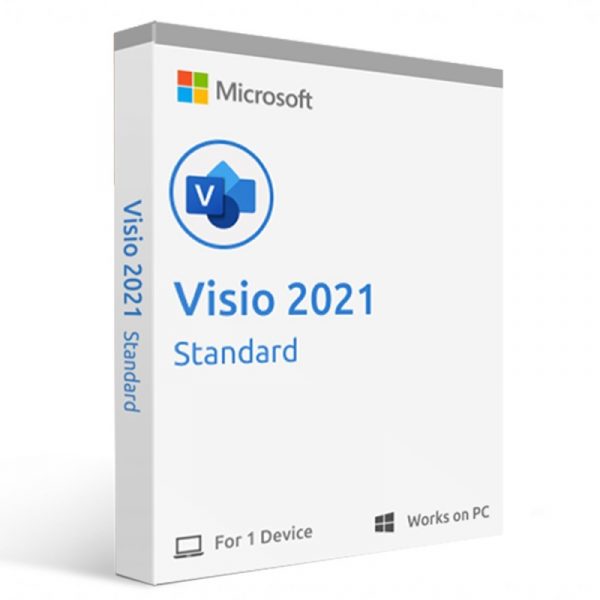
Microsoft Visio Standard 2021
฿7,618.33
*BRAND: Micrososft
*VERSION: Visio Standard
*LICENSE: Perpetual
*ACTIVATIONS: 1
*FORMAT: Digital download
*PLATFORM: Windows 10, 11
*REGION: Global
*INSTALLING: Easy to follow instructions to renew subscription or download & install
Focus on Project Management: Microsoft Visio 2021 Standard is designed to effectively support project management, facilitating task planning and tracking with suitable tools.
Creation of Dynamic Organizational Charts: The feature allows the design of detailed organizational charts, providing a clear view of organizational structures and hierarchies.
Development of Practical Mind Maps: Visio 2021 Standard allows the creation of visually organized mind maps, useful for brainstorming and intuitively structuring ideas.
Seamless Integration with Microsoft Products: The tool integrates seamlessly with other Microsoft applications, such as Word and Excel, facilitating data transfer and consistency across different software.
Access to New BPMN Templates: The Standard version includes recent BPMN (Business Process Model and Notation) templates for effectively representing business processes.
Variety of Graphic Styles and Formats: Visio 2021 Standard offers a wide range of graphic styles and formats, allowing customization of diagrams to meet specific project needs.
Create Professional Diagrams Easily with Microsoft Visio 2021 Standard
Microsoft Visio 2021 Standard is a powerful diagram creation software, specially designed for Windows. It offers a simple and intuitive interface allowing users to create professional diagrams, organizational charts, floor plans, network diagrams, and more. With Microsoft Visio 2021 Standard, you can easily create diagrams and integrate them into other Microsoft products such as Word, PowerPoint, or Excel. You can also export your diagrams to various file formats such as PDF, PNG, or JPEG. The software provides a wide range of shapes, templates, and styles to help you design your diagrams quickly and efficiently. Additionally, you can integrate and automatically update data from other sources, such as Excel spreadsheets.
Practical Advantages with Microsoft Visio 2021 Standard
Microsoft Visio 2021 Standard stands out for its numerous practical advantages, making it a preferred choice for professionals needing to create modern and expressive diagrams. Here’s an overview of the main benefits:
Flexible and Customizable Creation
The simplicity of diagram and chart creation is one of Visio 2021 Standard’s main strengths. You can easily design diagrams according to your needs and choose the desired diagram type. Subsequent adjustments are also possible at any time.
Variety of Diagram Types
You don’t need to predefine the types of diagrams you want to create. The extensive selection of templates allows you to remain flexible in your design, ideal for compact solutions in all sectors.
Team Collaborative Work
Collaboration is not limited to individual work but can also be done directly in teams using Microsoft Teams. Synchronization is facilitated by cloud storage, allowing quick retrieval of essential content.
Data-Based Diagrams
Integration with real-time analytics allows automatic development of content. For example, you can create links with other Microsoft applications to use the same information in Visio 2021.
Who is Microsoft Visio 2021 Standard For?
Microsoft Visio 2021 Standard is intended for a variety of users, including:
Professionals and Entrepreneurs: Creating organizational charts, process diagrams, and other business diagrams.
IT Professionals: Developing network diagrams, system architecture, and data flow diagrams.
Engineers: Creating technical diagrams, schematics, and electrical plans.
Teachers and Students: Creating diagrams and process flows for research projects and presentations.
Project Managers: Creating project management diagrams, including Gantt charts and planning diagrams.
Architects: Designing architectural diagrams, plans, and space layouts.
Designers: Creating diagrams for various fields like graphic design, web design, and more.
Researchers: Creating scientific diagrams, including chemical structures and biological flows.
Trainers and Consultants: Creating presentation diagrams and flows for training and consulting projects.
Seamless Integration with the New Windows 11
Microsoft Visio 2021 Standard was recently released alongside Windows 11, bringing new designs and improved performance. This simultaneous release allows for a seamless use of Office applications while optimizing the experience with the new operating system.
Here’s how Microsoft Visio 2021 Standard benefits from this integration:
Harmonized Design
Visio 2021 Standard benefits from Windows 11’s visual adjustments, providing a consistent interface with the operating system and other Office applications. The changes are primarily superficial and do not introduce major new features.
Modern Graphic Elements
The 2021 version includes recent color gradients, wireframe diagrams of applications, workplace planning tools, and adapted AWS templates. These updates enhance Visio’s design and flexibility.
Progressive Evolution
Updates focus on visual aspects, illustrating Visio’s continued evolution with modern solutions while maintaining an aesthetic aligned with Windows 11.
Compare Microsoft Visio 2021 Standard and Professional: Find the Ideal Version for Your Needs
The Standard and Professional versions of Microsoft Visio 2021 cater to professionals involved in project management but have notable differences in features. Here’s a comparison of the two editions available on the market:
Related products
-
Microsoft Visio Professional 2024
฿10,548.45 -
Microsoft Office Professional Plus 2021
฿3,516.15 -
Microsoft Office Project Professional 2021
฿5,860.25 -
Microsoft Office Home & Student 2021
฿3,750.56
Reviews
There are no reviews yet.